Overview
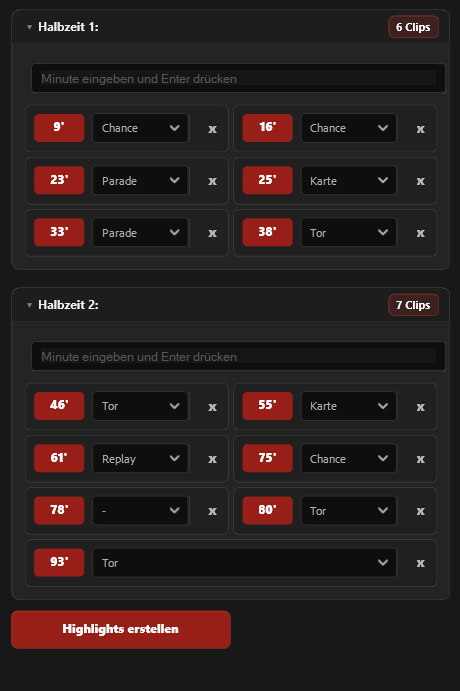
matchCut is a Premiere Pro plugin that turns football match minutes into organized highlight clips within seconds. Instead of manually searching through an entire match timeline, setting in and out points, naming clips, and building a highlight sequence by hand, editors can simply enter the most important match minutes and automatically create clean, sorted clips from the source footage.
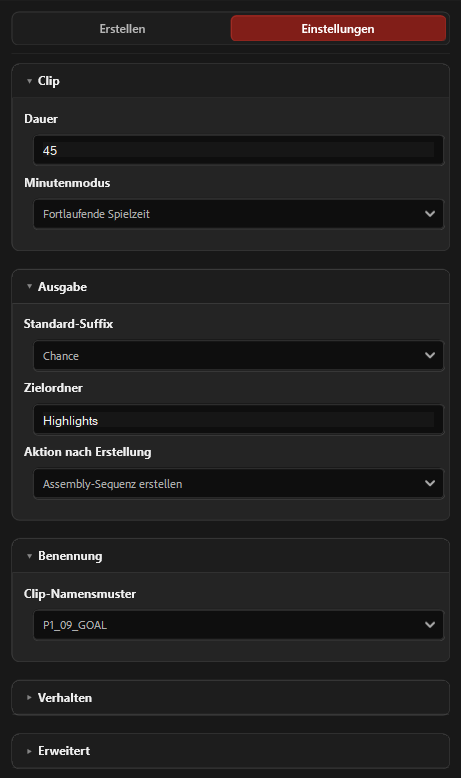
matchCut was built specifically for football workflows and uses the first two video clips as the two halves of the match. Editors can define the clip duration, choose how match minutes should be interpreted, select an output bin, and decide whether they want to create project clips only or generate a complete assembly sequence as well.
The plugin is especially useful for match analysis, social media edits, highlight reels, scouting videos, and fast post-match productions. Whether you are collecting goals, chances, saves, fouls, cards, or replay moments, matchCut keeps everything structured and easy to find.
matchCut can create media-based clips. This means that highlights placed in an assembly sequence can still be extended in the timeline, as long as the source footage provides enough handles. This gives editors speed without sacrificing flexibility. After the automatic creation process, you can continue trimming, extending, rearranging, or refining the highlights directly in Premiere Pro.
Key features
Create football highlight clips directly from entered match minutes
Supports match timelines with two halves using the first two clips
Choose a custom clip duration for each highlight
Create clips only or automatically build a sorted assembly sequence
Use either cumulative match time or reset minutes for each half
Customize clip names with flexible naming patterns
Add suffixes such as GOAL, CHANCE, SAVE, CARD, FOUL, and REPLAY
Color-label clips based on their suffix using Premiere Pro label colors
Save time when repeatedly creating and organizing highlights
Built for Adobe Premiere Pro workflows
settings