
Premiere Pro MOGRTs
What Is a MOGRT?
A MOGRT is a Motion Graphics Template for Adobe Premiere Pro. The file extension is .mogrt and describes a pre-built animated graphic that can be imported, edited and reused directly in Premiere Pro.
MOGRTs are commonly used for title animations, lower thirds, intros, outros, social media graphics, subtitle designs, callouts, animated charts and infographics. Instead of recreating the same animation from scratch for every video, editors can work with a reusable template and adjust the most important elements directly inside their editing project.
The main advantage of a MOGRT is that complex motion design becomes easier to use. A designer can create the animation once in After Effects or Premiere Pro and export it as a Motion Graphics Template. Editors can then customize elements such as text, colors, logos, images, labels, values or layout settings without opening After Effects.
Why Are MOGRTs Useful in Premiere Pro?
MOGRTs save time and help keep video projects visually consistent. They are especially useful when the same type of graphic is needed across multiple videos, campaigns, formats or channels.
For companies, content creators, YouTubers, agencies, marketing teams and media departments, MOGRTs make it easier to create professional video graphics without slowing down the editing process. Recurring elements such as logo animations, name titles, section dividers, animated charts or branded layouts can be added quickly while still matching the visual style of the project.
How Do You Use a MOGRT in Premiere Pro?
A MOGRT is installed or imported into Premiere Pro via drag and drop. Once added, the template can be dragged into the timeline like a regular graphic element.
Depending on how the template is built, different properties can be edited directly in Premiere Pro. These may include text, font size, colors, positions, media placeholders, logos, chart values, labels or animation settings.
This allows editors to use professional animated graphics without needing advanced motion design knowledge or rebuilding the animation in After Effects.
Built for Flexible Brand Customization
Our Premiere Pro MOGRTs are built with flexibility in mind. Wherever possible, we include detailed controls for colors, typography, layout, backgrounds and visual styling, so the templates can be adapted closely to your own corporate identity and brand guidelines.
This makes the MOGRTs especially useful for teams that need repeatable video graphics across different projects while still maintaining a consistent brand appearance. Instead of working around a fixed design, you can adjust the template to fit your visual language as closely as possible.
Our MOGRTs
Our MOGRTs help you create videos in Adobe Premiere Pro faster, more professionally, and with a higher-quality visual style. The Motion Graphics Templates can be customized directly in the Essential Graphics panel and do not require any additional editing in After Effects.
Charts and Data
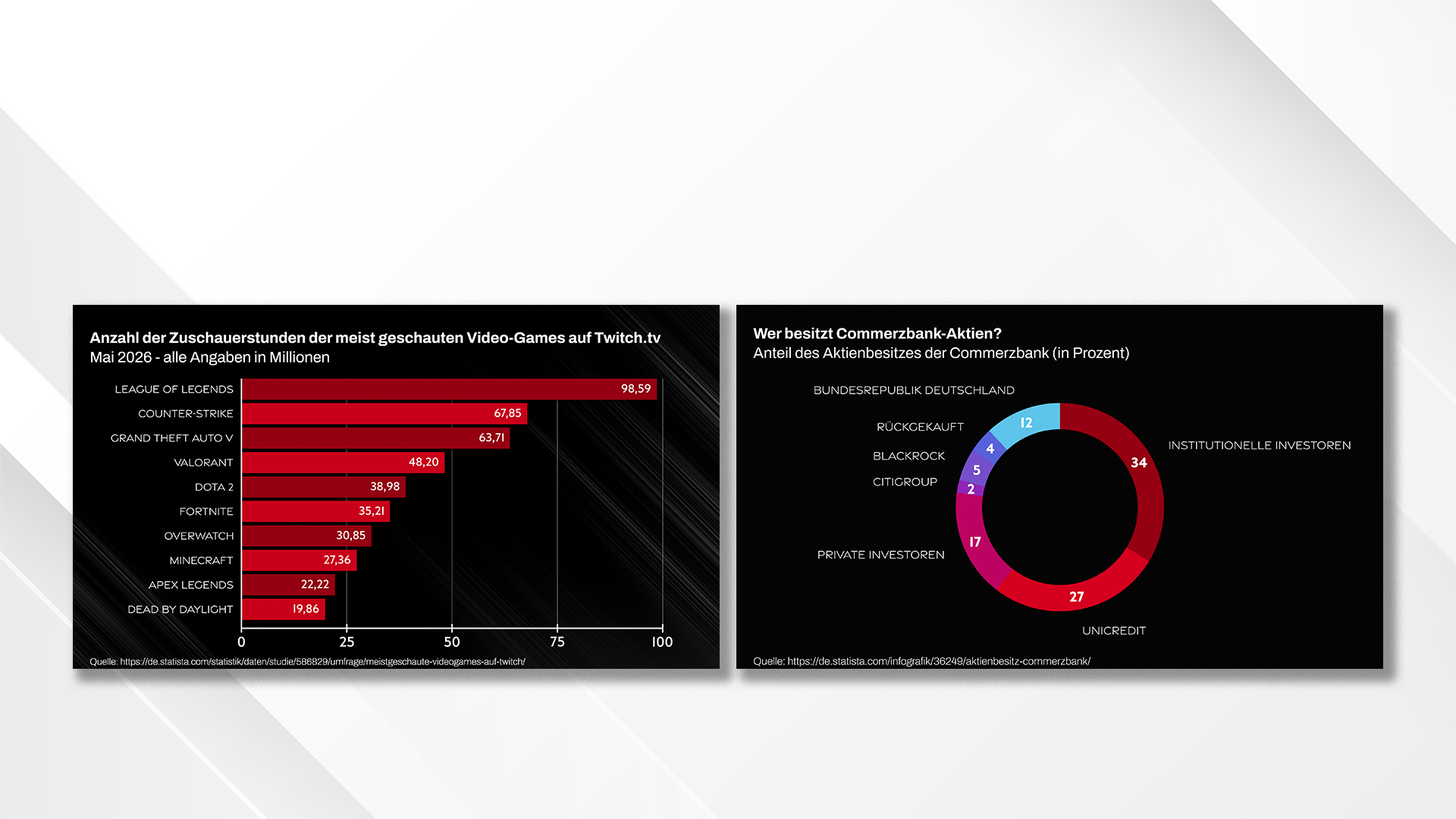
Our chart MOGRTs for Premiere Pro help you present numbers, statistics and comparisons in a clear, polished and visually engaging way. Instead of building animated charts from scratch, you can work with flexible Motion Graphics Templates that are ready to use directly in your video projects.
Values, labels, colors, titles, sources and layout settings can be customized individually, so each chart can be adapted to your content, your visual style and your brand identity. This makes the templates especially useful for explainer videos, social media content, YouTube videos, presentations, reports and data-driven business content.
With our chart MOGRTs, dry numbers become clean, modern animations that make your videos look more professional and help viewers understand the information faster.
FAQ & Glossary: Motion Graphics Templates & Statistics Templates
Answers to common questions about MOGRTs, Premiere Pro templates, and animated statistics — for editors who are new to Motion Graphics Templates or comparing options before choosing one.
What is a MOGRT?
MOGRT stands for Motion Graphics Template. It's a file format (.mogrt) created in Adobe After Effects and designed to be used inside Adobe Premiere Pro. A MOGRT packages a pre-built animation — like an animated chart, lower third, or title card — into a single file with editable controls exposed through the Essential Graphics panel.
Instead of opening After Effects, you drag the MOGRT into your Premiere Pro timeline and adjust values, text, colors, and layout directly in Premiere. No After Effects knowledge or software required.
What's the difference between a MOGRT and a Premiere Pro preset?
A preset is a saved setting — usually for an effect, transition, or color adjustment — that gets applied to existing footage or layers. It modifies something already in your timeline.
A MOGRT is a self-contained animated graphic. It's not applied to your footage; it sits on its own layer as a designed element, like an animated statistics chart, title, or lower third, with its own timeline and controllable properties.
In short: presets adjust, MOGRTs add.
What is a statistics template?
A statistics template is a MOGRT specifically designed to visualize numbers — like a bar chart, line chart, or donut chart — instead of using static tables or plain on-screen text. Statistics templates typically let you edit values, labels, colors, and titles directly in Premiere Pro, and animate the data automatically once new values are entered.
They're commonly used in explainer videos, YouTube content, sports coverage, corporate reports, and documentaries where numbers need to be communicated quickly and clearly.
Do I need After Effects to use a MOGRT?
No. MOGRTs are built in After Effects, but they're designed to be used entirely within Premiere Pro. You only need After Effects if you want to open and edit the MOGRT's internal structure — which isn't necessary for normal use.
Can I edit the data in a chart or statistics MOGRT?
Yes. Well-built statistics and chart templates expose data fields — values, labels, and sometimes full CSV import — through the Essential Graphics panel in Premiere Pro. You can update the numbers, and the animation adjusts automatically without any manual keyframing.
What's the difference between a bar chart, line chart, and donut chart template?
Bar chart – best for comparing values across categories or rankings (e.g., "which product sold the most").
Line chart – best for showing trends or change over time (e.g., "how a stat evolved over months or years").
Donut chart – best for showing proportions or percentages of a whole (e.g., "market share breakdown").
Choosing the right chart type matters more for clarity than design — the wrong chart type can make accurate data look confusing.
Can I use a MOGRT for commercial or client work?
This depends on the license included with the template. Most MOGRT creators, including ours, offer tiered licenses (personal, commercial, extended) that define whether the template can be used in monetized content, client projects, or resold work. Always check the specific license terms before commercial use.
Will a MOGRT work in any version of Premiere Pro?
Most modern MOGRTs are built to work across recent Premiere Pro versions, but compatibility can vary — especially with templates using advanced expressions. If a template is built with Premiere Pro compatibility in mind (rather than just After Effects), it should behave consistently once imported.

Need a custom MOGRT for your projects?
Simply fill out the form with a few details about your requirements. Let us know what type of template you need, which features are important, and how the MOGRT will be used. We’ll review your request and get back to you as soon as possible with an initial assessment of implementation, scope, and workflow.